πChapter 8: Understanding tradeUI vs webserverUI in Freqtrade
This article was produced by the Quantitative Trading Lab at https://www.itrade.icu. Visit for more benefits. Although often used together,
tradeandwebserverserve completely different purposes and have distinct startup logic. Here's a detailed comparison:
Item
freqtrade trade
freqtrade webserver
β Startup Content
Starts the trading bot (live or dry-run)
Starts the visualization UI service (view data)
βοΈ Core Function
Execute strategy, place orders, monitor market
Graphically display strategy operation/backtest results
π§ Runs Strategy Logic
β Yes (real-time execution)
β No (only reads data)
π¦ Data Source
Real-time market data & order execution
Local SQLite database (or strategy output)
β± Use Case
Real/simulated trading
Browser view of strategy performance/order info
π Connects to Exchange
β Yes
β No
π View Backtest Results
β No
β Supports backtest visualization
β
Use Case Distinction
1. trade is the bot engine
trade is the bot engineYou can run live trading or dry-run (simulation):
freqtrade trade \
--config user_data/config.json \
--strategy MyStrategy \
--dry-runContinuously fetches real-time market data
Executes strategy logic (buy/sell signals)
Connects to the exchange and records orders, balances, profits
Writes all data to a local database (SQLite)
π‘ Without it, the bot does nothing!
2. webserver is the visualization interface
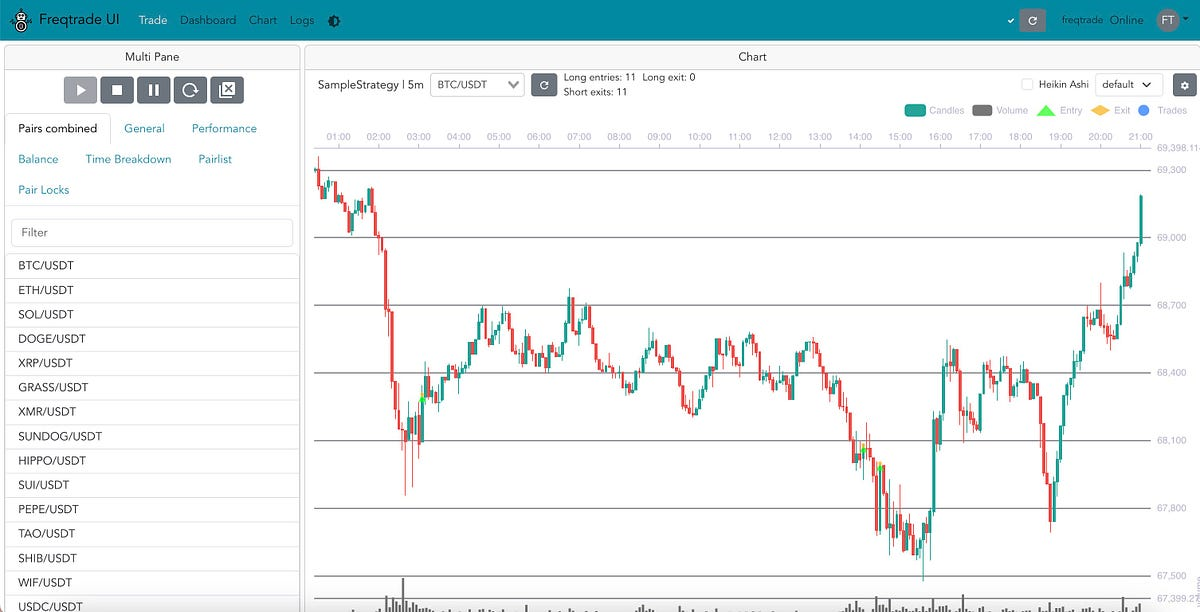
webserver is the visualization interfaceIt only reads existing data and provides a browser-based UI:
Displays current positions, trade history, strategy names
Can monitor running strategies
Can also display backtest results (after
backtesting)
β It does not run strategies or connect to exchanges!

π Relationship Summary
trade= the execution enginewebserver= the observer UI
If you run only webserver without trade, you can only see historical recordsβno new trades will occur.
π§© Practical Advice (Docker Setup)
Then open your browser at:
to access the trading bot dashboard.
Last updated